Showing Posts From
Angular js routing
-
 Jeetendra Singh
 - 14 Nov, 2016
Url rewriting example in angular js
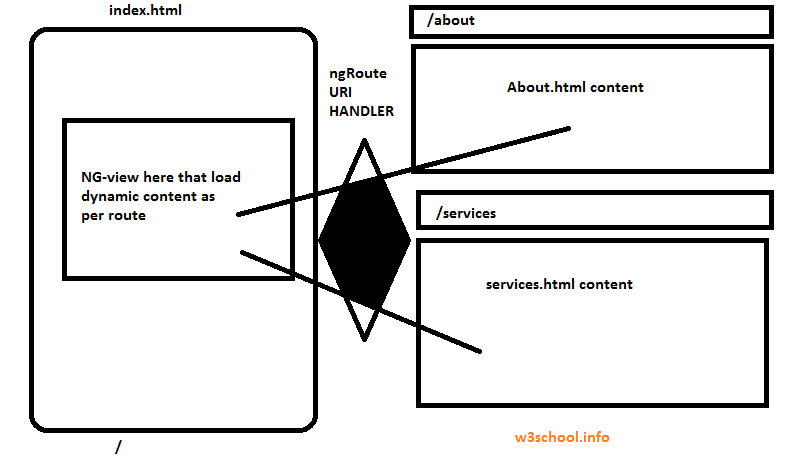
Hi Geeks, I am sharing Url rewriting example in angular js with complete steps to achieve it . If you are beginner with angular js then you might faced some issues with hash(#) in angular. So i am proving you the complete snippet and steps for making your url clean/pretty to make your angular js website seo friendly. you can download full source code from here or you can follow the steps, leave comments in comment box if you face any problem to achieve this Step 1 . for your index.html file write following code in your htaccess file. RewriteEngine on Don't rewrite files or directories RewriteCond %{REQUEST_FILENAME} -f [OR] RewriteCond %{REQUEST_FILENAME} -d RewriteRule ^ - [L] RewriteRule ^ index.html [L] Step 2. In index.html head section please put following lines :Note : in base href you need to provide your project url if on local, and for server you can set it only slash (/) . Step 3. Now according to the uri we need to load the page content , So we need to create a dynamic view and it will load the content as per the uri component :**Step 4**: write the Routing for load different different html views as per the uri component, in index.htmlSo wee need to initialize and use this code for configure and defining route provider and need to enable the html5 mode to true. Here locationprovider and routeprovider and http angular predefined directves wil be use here define app name in body using ng-app directive using as follow: ng-app="MyApp" and include the angular and routing libraries as follow :Now we initialize and define configuration for the MyApp as follow with injecting the ngRoute Directive:var MyApp = angular.module('MyApp', ["ngRoute"]);MyApp.config(['$routeProvider', '$locationProvider', function ($routeProvider,$locationProvider,$http){ $locationProvider.hashPrefix('!'); $locationProvider.html5Mode(true); $routeProvider .when('/', {templateUrl:'home.html' }) .when('/about', {templateUrl:'about.html' }) .when('/services', {templateUrl:'services.html' }) .when('/not-found', {templateUrl:'404.html' }) .otherwise({ redirectTo:'/not-found' }); }]);Note: I specify the url slugs and assign the template url according to the uri . you need to make each page to load the content as per the url. You have sucessfully done the url rewriting in angular js . Now full code of your index.htmlMy SEO Friendly ANGULAR APP MY ANGULAR SEO REWRITING DEMO APP Home About Services var MyApp = angular.module('MyApp', ["ngRoute"]); MyApp.config(['$routeProvider', '$locationProvider', function ($routeProvider,$locationProvider,$http){ $locationProvider.hashPrefix('!'); $locationProvider.html5Mode(true); $routeProvider.when('/', {templateUrl:'home.html' }) .when('/about', {templateUrl:'about.html' }) .when('/services', {templateUrl:'services.html' }) .when('/not-found', {templateUrl:'404.html' }).otherwise({ redirectTo:'/not-found' }); }]);Download full source code here