Showing Posts From
Validation in angular js
-
 Jeetendra Singh
 - 16 Nov, 2016
Form Processing and validation in Angular js
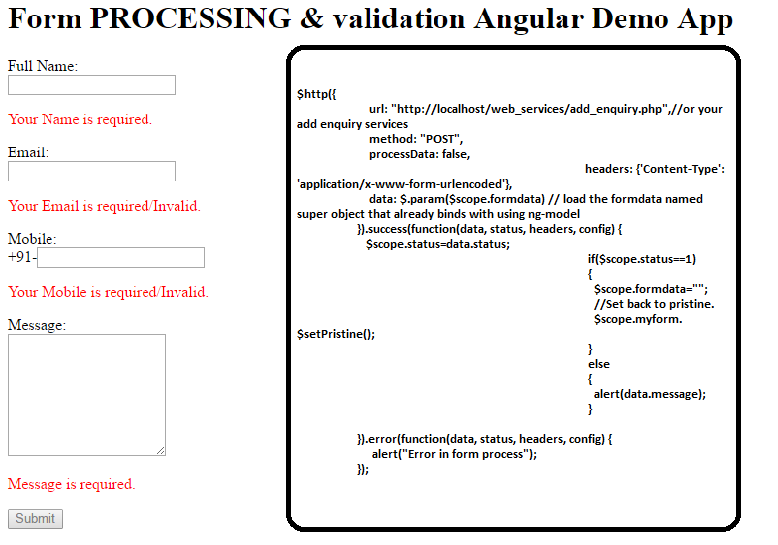
Hi Geeks, In this tutorial you will learn form processing and validation in angular js. where i have focused on validation in angular js, and after validation save the formdata to server/database using webservice. Step 1: Include the angular js in head section byStep 2:Define app name in body tagStep 3: Create a controller div, and for this controller we will write handler in javascript codeStep 4 : Create your form inside controller div and take name of that form it will use in validation the form fieldsFull Name:Your Name is required.Email:Your Email is required/Invalid.Mobile: +91-Your Mobile is required/Invalid.Message: Message is required.Submithere we’ll create a submit form named function in controller of this view to submit the information over server.but this function will call only when our form passes all validations. All data will binds to super object named formdata which we have used in every ng-model by using that single object we will send data to server. it will very usefull to collect data from every fields and create a bunch. thats why we have used formdata.{field_name} in every ng-model Now validation directives used in this form are following:Define form name attribute is must for validation , we have take myform as form name.For making a field required , we need to use required attribute For patter use ng-pattern , following pattern is a email syntaxng-pattern=”/^[^\s@]+@[^\s@]+.[^\s@]{2,}$/”ng-minlength is use for minimum length of input number/characters ng-maxlength is for maximum length of input number/characterswe have used minimum and maximum length of mobile number as per indian mobile standards ng-minlength=”10″ ng-maxlength=”10″ Showing a message below of each field ng-show=”{form_name}.{field_name}.$invalid && !{form_name}.{field_name}.$pristine” for example of full_name in this form we will use >> ng-show=”myform.full_name.$invalid && !myform.full_name.$pristine” Step 5: Now write angular controller code for form processing: Create a module for the ng-app var MyApp = angular.module('MyApp',[]); Now after it define the controller method body MyApp.controller('contactForm_CTRL', function ($scope, $http){ //form submit handler will come here }); Now create a method which we have used in form tag ng-submit directive name ‘submit_form()’ so create a method submit_form() inside the controller as following //create a submit action on form submit// $scope.submit_form = function() { $http({ url: "http://localhost/web_services/add_enquiry.php",//or your add enquiry services method: "POST", processData: false, headers: {'Content-Type': 'application/x-www-form-urlencoded'}, data: $.param($scope.formdata) // load the formdata named super object that already binds with using ng-model }).success(function(data, status, headers, config) { $scope.status=data.status; if($scope.status==1) { $scope.formdata=""; //Set back to pristine. $scope.myform.$setPristine(); } else { alert(data.message); } }).error(function(data, status, headers, config) { alert("Error in form process"); });} this function send your data to server and get response in json and handle the response in success callback if all data is fine then we will save it to db in webservices and return 1 and reset the formdata and show success message that is returned by webservice in alert with following: $scope.formdata=""; $scope.myform.$setPristine();//for flush all the validation errors/messages previously alert(data.message); If In status ,any error then we will return status 0 and failed message also. We will show that failed message in alert as following alert(data.message); Note: there is a error callback for any unexpected error from webservices that time we have alert following message: alert("Error in form process"); Now in your web_services/add_enquiry.php you can use following code : 1,"message"=>"Successfully Inserted");// data that will use to return to the angular/client app } else { //if query fails $response=array("status"=>0,"message"=>"Failed to add!"); } //now convert the array of response into json by using $return_json=json_encode($response); print $return_json; //print the json to return to client}mysqli_close($conn);//close connection ?> Note: Or write your own code just like a normal post of form. Now complete index.html code is following:Form PROCESSING & validation Angular App Form PROCESSING & validation Angular Demo AppYour Name is required.Your Email is required/Invalid.Your Mobile is required/Invalid. Message is required.Submitvar MyApp = angular.module('MyApp',[]);MyApp.controller('contactForm_CTRL', function ($scope, $http){ //create a submit action on form submit// $scope.submit_form = function() { $http({ url: "http://localhost/web_services/add_enquiry.php",//or your add enquiry services method: "POST", processData: false, headers: {'Content-Type': 'application/x-www-form-urlencoded'}, data: $.param($scope.formdata) // load the formdata named super object that already binds with using ng-model }).success(function(data, status, headers, config) { $scope.status=data.status; if($scope.status==1) { $scope.formdata=""; $scope.myform.$setPristine();//for flush all the validation errors/messages previously alert(data.message); } else { alert(data.message); } }).error(function(data, status, headers, config) { alert("Something Error in form process"); });} });Comment here if you face any problem in this Thanks.