Showing Posts From
Create multilevel menu using php and mysql
-
 Jeetendra Singh
 - 22 Dec, 2015
Steps to create dynamic multilevel menu using php and mysql
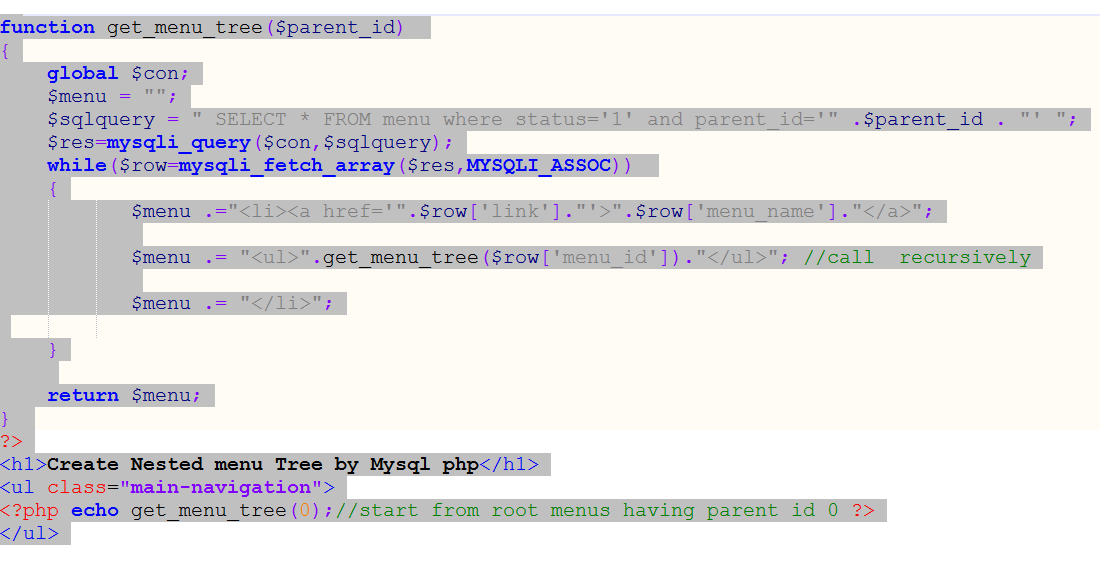
Hi Geeks, Today i am sharing you ” Steps to create dynamic multilevel menu using php and mysql” which can be called “example of recusion in php & mysql”. What Exactly recursion is ? Recursion is a technique or Algorithm by which we can go and return the collection of sequenced data with n depth. It is a condition based child search and return the output to the previous stepped varriable’s scope. we can solve many of the programming problems using recursion. In following Example we will sort out a problem where we need to show nested n number of depth relation saved in mysql menu table with having proper opening and closng the and tags in html. Following are the steps : Step 1. Create a mysql Table in your database by executing following sql statement -- -- Table structure for table menu CREATE TABLE IF NOT EXISTS menu ( menu_id int(11) NOT NULL AUTO_INCREMENT, menu_name varchar(255) NOT NULL, parent_id int(11) NOT NULL DEFAULT '0' COMMENT '0 if menu is root level or menuid if this is child on any menu', link varchar(255) NOT NULL, status enum('0','1') NOT NULL DEFAULT '1' COMMENT '0 for disabled menu or 1 for enabled menu', PRIMARY KEY (menu_id) ) ENGINE=InnoDB DEFAULT CHARSET=latin1 AUTO_INCREMENT=37 ; -- -- Dumping data for table menu INSERT INTO menu (menu_id, menu_name, parent_id, link, status) VALUES (1, 'Home', 0, '#home', '1'), (2, 'Web development', 0, '#web-dev', '1'), (3, 'WordPress Development', 0, '#wp-dev', '1'), (4, 'About w3school.info', 0, '#w3school-info', '1'), (5, 'AWS ADMIN', 2, '#', '1'), (6, 'PHP', 2, '#', '1'), (7, 'Javascript', 2, '#', '1'), (8, 'Elastic Ip', 5, '#electic-ip', '1'), (9, 'Load balacing', 5, '#load-balancing', '1'), (10, 'Cluster Indexes', 5, '#cluster-indexes', '1'), (11, 'Rds Db setup', 5, '#rds-db', '1'), (12, 'Framework Development', 6, '#', '1'), (13, 'Ecommerce Development', 6, '#', '1'), (14, 'Cms Development', 6, '#', '1'), (21, 'News & Media', 6, '#', '1'), (22, 'Codeigniter', 12, '#codeigniter', '1'), (23, 'Cake', 12, '#cake-dev', '1'), (24, 'Opencart', 13, '#opencart', '1'), (25, 'Magento', 13, '#magento', '1'), (26, 'Wordpress', 14, '#wordpress-dev', '1'), (27, 'Joomla', 14, '#joomla-dev', '1'), (28, 'Drupal', 14, '#drupal-dev', '1'), (29, 'Ajax', 7, '#ajax-dev', '1'), (30, 'Jquery', 7, '#jquery-dev', '1'), (31, 'Themes', 3, '#theme-dev', '1'), (32, 'Plugins', 3, '#plugin-dev', '1'), (33, 'Custom Post Types', 3, '#', '1'), (34, 'Options', 3, '#wp-options', '1'), (35, 'Testimonials', 33, '#testimonial-dev', '1'), (36, 'Portfolios', 33, '#portfolio-dev', '1'); Step 2. Connect with databaseStep 3. Implement the recursion logic ".$row['menu_name'].""; $menu .= "".get_menu_tree($row['menu_id']).""; //call recursively $menu .= ""; } return $menu; } ?>Step 4: Ininitialize start the Recursion in Parent Content HolderStep 5: Close the Mysql connectionStep 6. depth css implementation in style tag in head sectionul { list-style: none; padding: 0; margin: 0; background: #1bc2a2; }ul li { display: block; position: relative; float: left; background: #1bc2a2; }/* This hides the dropdowns */li ul { display: none; }ul li a { display: block; padding: 1em; text-decoration: none; white-space: nowrap; color: #fff; }ul li a:hover { background: #2c3e50; }/* Display the dropdown */li:hover > ul { display: block; position: absolute; }li:hover li { float: none; }li:hover a { background: #1bc2a2; }li:hover li a:hover { background: #2c3e50; }.main-navigation li ul li { border-top: 0; }/* Displays second level dropdowns to the right of the first level dropdown */ul ul ul { left: 100%; top: 0; }/* Simple clearfix */ul:before, ul:after { content: " "; /* 1 */ display: table; /* 2 */ }ul:after { clear: both; }Conclusion : Complete Code in one File.create dynamic multilevel menu using php and mysqlul { list-style: none; padding: 0; margin: 0; background: #1bc2a2; }ul li { display: block; position: relative; float: left; background: #1bc2a2; } /* This hides the dropdowns */ li ul { display: none; } ul li a { display: block; padding: 1em; text-decoration: none; white-space: nowrap; color: #fff; } ul li a:hover { background: #2c3e50; } /* Display the dropdown */ li:hover > ul { display: block; position: absolute; } li:hover li { float: none; } li:hover a { background: #1bc2a2; } li:hover li a:hover { background: #2c3e50; } .main-navigation li ul li { border-top: 0; } /* Displays second level dropdowns to the right of the first level dropdown */ ul ul ul { left: 100%; top: 0; } /* Simple clearfix */ ul:before, ul:after { content: " "; /* 1 / display: table; / 2 */ } ul:after { clear: both; }// Perform queries function get_menu_tree($parent_id) { global $con; $menu = ""; $sqlquery = " SELECT * FROM menu where status='1' and parent_id='" .$parent_id . "' "; $res=mysqli_query($con,$sqlquery); while($row=mysqli_fetch_array($res,MYSQLI_ASSOC)) { $menu .="<a href='".$row['link']."'>".$row['menu_name'].""; $menu .= "".get_menu_tree($row['menu_id']).""; //call recursively $menu .= ""; }return $menu;} ?> Create Nested menu Tree by Mysql php