Showing Posts From
Others
-
 Jeetendra Singh
 - 20 Feb, 2016
How to work with AngularJS as frontend and PHP MYSQL as backend
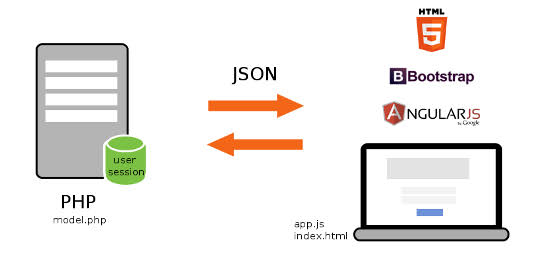
Hi Geeks, In this tutorial you will learn that how to work with AngularJs as web frontend or in any hybrid app and get retrieve data from database using php and mysql. We have created restful webservice for return records to angular app. Now steps for making a angularjs app with php and mysql – Step 1) Create a database and table for fetching content from the table Note: If you want to use existing database then select you db else create a new db with ‘news_db’ or whatever you want to take a db name. Now Create a table named ‘news’ for getting data by following sql statement CREATE TABLE IF NOT EXISTS news ( id int(12) NOT NULL AUTO_INCREMENT, title varchar(255) NOT NULL, permalink varchar(255) NOT NULL, details text NOT NULL, thumbnail varchar(255) NOT NULL, category_id int(12) NOT NULL, source_id int(12) NOT NULL, datetime int(12) NOT NULL, day int(2) NOT NULL, month int(2) NOT NULL, year int(4) NOT NULL, hits int(12) NOT NULL, published int(1) NOT NULL, PRIMARY KEY (id) ) ENGINE=MyISAM DEFAULT CHARSET=utf8 AUTO_INCREMENT=1; Now Dump some dummy records by following insert statement: -- -- Dumping data for table news INSERT INTO news (id, title, permalink, details, thumbnail, category_id, source_id, datetime, day, month, year, hits, published) VALUES (1, 'MY NEWS TITLE 1', '', 'The standard chunk of Lorem Ipsum used since the 1500s is reproduced below for those interested. Sections 1.10.32 and 1.10.33 ', '11621455015936.jpg', 1, 0, 1455015936, 9, 2, 2016, 45, 1), (2, 'MY NEWS TITLE 2', '', 'Lorem Ipsum is simply dummy text of the printing and typesetting industry. ', '76911455015952.jpg', 2, 0, 1455015952, 9, 2, 2016, 73, 0); Step 2) Create a file named config.php with following codechange credential according to your database and server host Step 3) Now create a file for webservices named wsdl.php Define Cross origin headers in this file by following codeNow code for getting data from database and provide in restful json format by following code query("SELECT title,details,hits FROM news"); $data=array(); while($rs = $result->fetch_array(MYSQLI_ASSOC)) { $row=array(); $row['title']=addslashes($rs["title"]); $row['details']=addslashes($rs["details"]); $row['hits']=addslashes($rs["hits"]); $data[]=$row; } $jsonData=array(); $jsonData['records']=$data; $conn->close(); echo json_encode($jsonData);} ?>So complete Code for wsdl.php is following query("SELECT title,details,hits FROM news"); $data=array(); while($rs = $result->fetch_array(MYSQLI_ASSOC)) { $row=array(); $row['title']=addslashes($rs["title"]); $row['details']=addslashes($rs["details"]); $row['hits']=addslashes($rs["hits"]); $data[]=$row; } $jsonData=array(); $jsonData['records']=$data; $conn->close(); echo json_encode($jsonData);} ?>Step 4) Now Start with frontend Step for Getting data from database using angularjs as frontend and php & mysql as backed make a file named index.html include the script which i have attached with this postNow make a ng-app with following htmlmake a html table format inside the div for getting data from datasource(php/mysql restful service) as following {{ x.title }} {{ x.details }} {{ x.hits }}Now put the script that call the restful web service and load data to the tablevar app = angular.module('myApp', []); app.controller('newsCtrl', function($scope, $http) { $http.get("http://localhost/angular/wsdl.php?method=load_news") .then(function (response) {$scope.names = response.data.records;}); });Now complete Code for index.html {{ x.title }} {{ x.details }} {{ x.hits }}var app = angular.module('myApp', []); app.controller('newsCtrl', function($scope, $http) { $http.get("http://localhost/angular/wsdl.php?method=load_news") .then(function (response) {$scope.names = response.data.records;}); });Congratulations you have completed with this tutorial please provide comments for this tutorial. [viraldownloader id=146 text=’DOWNLOAD COMPLETE CODE’]