Showing Posts From
Complete login system in codeigniter php
-
 Jeetendra Singh
 - 09 Dec, 2015
complete login system in codeigniter php
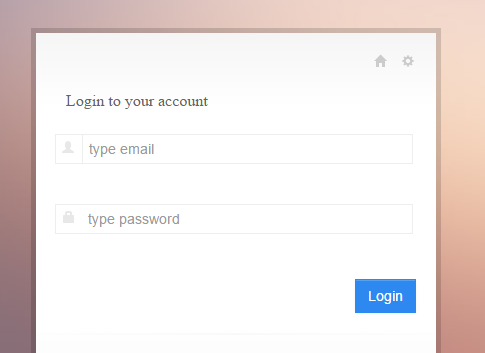
Hi Geeks, I am showing you “complete login system in codeigniter php”. In this example i’ll show you a simple login example with srored procedure in codeigniter framework. Step 1. Install Codeigniter and configure database.php in application/config folder Step2. create a table in your databse by following sql statement --create table staement-- CREATE TABLE IF NOT EXISTS webadmin ( id int(11) NOT NULL AUTO_INCREMENT, name varchar(255) NOT NULL, email varchar(255) NOT NULL, password varchar(255) NOT NULL, website varchar(255) NOT NULL, is_active int(11) NOT NULL DEFAULT '0', is_delete int(11) NOT NULL DEFAULT '0', added_date datetime NOT NULL, modified_date timestamp NOT NULL DEFAULT '0000-00-00 00:00:00' ON UPDATE CURRENT_TIMESTAMP, address varchar(255) NOT NULL, admin_ip varchar(255) NOT NULL, PRIMARY KEY (id) ) ENGINE=InnoDB DEFAULT CHARSET=latin1 AUTO_INCREMENT=17 ; -- -- Dumping data for table webadmin INSERT INTO webadmin (id, name, email, password, website, is_active, is_delete, added_date, modified_date, address, admin_ip) VALUES (1, 'Jeetendra', '[email protected]', 'e10adc3949ba59abbe56e057f20f883e', 'https://www.w3school.info', 1, 0, '2015-11-18 08:24:49', '2015-11-18 11:58:01', 'JAIPUR', '192.256.1.1'); Note : By default in sql dump we have following login details set Login Credentials: email : [email protected] password:123456 //in sql dump file password saved in md5 encryted. Step 3.Now Create a Procedure named LOGIN_AUTH by executing following sql statement in phpmyadmin by select your db and in sql execute area. CREATE PROCEDURE LOGIN_AUTH(IN _email VARCHAR(255) CHARSET utf8, IN _password VARCHAR(255) CHARSET utf8) NOT DETERMINISTIC NO SQL SQL SECURITY DEFINER SELECT * FROM webadmin WHERE (is_active='1' and is_delete='0') and ( email= _email and password = _password ) In this satement we have created a stored procedure which accepts 2 parameters varchar email and password, and in procedure body there is a select match sql statement that verify that user is having details or exists with these details. Step 4. Create a Model named “Common_model.php” in your model folder by putting following code. db->reconnect(); $sql = "CALL `".$proc_name."`"; $indexes=array(); foreach($data as $c) { $indexes[]="?"; } if(count($indexes)>0) $sql.= "(".implode(",",$indexes).")"; else $sql.= "()"; $result = $this->db->query($sql,$data); if($only_exec==0) $ret = $result->result_array(); else $ret = $result; $this->db->close(); } catch (Exception $e) { echo $e->getMessage(); } return $ret; }} ?>Note : Make home controller as default controller in application/config/routes.php $route['default_controller'] = 'home'; Step 5. Now create a Controller named “Home.php” controller in you Controller folder with following code. load->database(); $this->load->helper('url'); $this->load->model('Common_model'); } public function index() { $this->check_alreadylogin();//send to dashboard if session data is exist or user is already logged in or logged information is saved in session. $this->load->library('form_validation'); $config = array( array( 'field' => 'user_username', 'label' => 'Email', 'rules' => 'trim|required|valid_email' ), array( 'field' => 'user_password', 'label' => 'Password', 'rules' => 'trim|required' ) ); $this->form_validation->set_rules($config); if($this->form_validation->run() == FALSE) { $this->data['page_title']="Login Controller"; $this->load->view('login'); }else{ $username = trim($this->input->post('user_username')); $password = md5(trim($this->input->post('user_password'))); $data[0]=$username; $data[1]=$password; $this->_authenticate($data); } } public function _authenticate($data) { $retRes=$this->Common_model->exec_proc("LOGIN_AUTH",$data); if(!empty($retRes)){ $this->session->set_userdata('webadmin_session',$retRes[0]); $this->webadmin_session = $this->session->userdata('webadmin_session'); redirect('/dashboard'); }else{ $this->session->set_flashdata('fail_msg','You don\'t have permission to access this Admin panel.'); redirect('/'); } } public function checklogin() { $is_login=$this->session->userdata('webadmin_session'); if(!isset($is_login['id']) || $is_login['id'] == 0 || $is_login['id'] == "" ) { $this->session->unset_userdata('webadmin_session'); redirect('/'); } } public function check_alreadylogin() { $already_login=$this->session->userdata('webadmin_session'); if(isset($already_login['id']) && $already_login['id'] > 0) { redirect('/dashboard'); } } public function dashboard() { $this->checklogin(); //use to logged out if use is not logged in or session has been out $UserData=$this->session->userdata('webadmin_session'); //retrieve user data from session$this->data['logged_username']=$UserData['name']; //assign the user name to the view for showing welcome username $this->load->view('dashboard'); } public function logout() { $this->session->unset_userdata('webadmin_session'); redirect('/'); } }?>In this Controller index function we create a login logic and called the model’s procedure execution function where we passes 2nd parameter as a data in array form with email and password respectively indexes. Now model picks the data array and set a order and prepare a stored procedure statement to execute. First parameter is procedure name,second is a order data array required by procedure, and third parameter if we require a data to be return by model then we have to pass third parameter with value 1 . Note: third parameter is optional. by default it doesn’t return any data it just receive 0 in third parameter by default. Step 6. Now we have create a View for loading the Login form with name “login.php” Login to your account <?php if($this->session->flashdata('fail_msg')!="") { echo '<p style="colr:red;">'; echo $this->session->flashdata('fail_msg'); echo '</p>'; } ?> <fieldset> <div class="input-prepend" title="Username"> <span class="add-on"><i class="halflings-icon user"></i></span> <input class="input-large span10" name="user_username" value="<?php echo set_value('user_username'); ?>" id="user_username" type="email" placeholder="type email"/> <?php echo form_error('user_username','<p class="alert alert-error">','</p>'); ?> </div> <div class="clearfix"></div> <div class="input-prepend" title="Password"> <span class="add-on"><i class="halflings-icon lock"></i></span> <input class="input-large span10" name="user_password" value="<?php echo set_value('user_password'); ?>" id="user_password" type="password" placeholder="type password"/> <?php echo form_error('user_password','<p class="alert alert-error">','</p>'); ?> </div> <div class="clearfix"></div>Step 7. create Dashboard View in views folder named dashboard.php with following codeWelcome config->base_url(); ?>index/logout">LOGOUTNow you are logged are in and this is dashboard view You cannot directly inter in this area,want to try on unlogged session ? just copy the current url from url bar and logout out by clicking on log out link in top. Now Paste the url in browser again it will automatic redirect to login form. If you Want Seo friendly Url or Remove index.php from the codeigniter url then Read following article. /blog/how-to-remove-index-php-from-codeigniter-url/