complete login system in codeigniter php
-
 Jeetendra Singh
 - 09 Dec, 2015
Hi Geeks, I am showing you “complete login system in codeigniter php”. In this example i’ll show you a simple login example with srored procedure in codeigniter framework. Step 1. Install Codeigniter and configure database.php in application/config folder Step2. create a table in your databse by following sql statement
—create table staement—
CREATE TABLE IF NOT EXISTS webadmin (
id int(11) NOT NULL AUTO_INCREMENT,
name varchar(255) NOT NULL,
email varchar(255) NOT NULL,
password varchar(255) NOT NULL,
website varchar(255) NOT NULL,
is_active int(11) NOT NULL DEFAULT ‘0’,
is_delete int(11) NOT NULL DEFAULT ‘0’,
added_date datetime NOT NULL,
modified_date timestamp NOT NULL DEFAULT ‘0000-00-00 00:00:00’ ON UPDATE CURRENT_TIMESTAMP,
address varchar(255) NOT NULL,
admin_ip varchar(255) NOT NULL,
PRIMARY KEY (id)
) ENGINE=InnoDB DEFAULT CHARSET=latin1 AUTO_INCREMENT=17 ;
—
— Dumping data for table webadmin
INSERT INTO webadmin (id, name, email, password, website, is_active, is_delete, added_date, modified_date, address, admin_ip) VALUES
(1, ‘Jeetendra’, ‘[email protected]’, ‘e10adc3949ba59abbe56e057f20f883e’, ‘https://www.w3school.info’, 1, 0, ‘2015-11-18 08:24:49’, ‘2015-11-18 11:58:01’, ‘JAIPUR’, ‘192.256.1.1’);
Note : By default in sql dump we have following login details set Login Credentials: email : [email protected] password:123456 //in sql dump file password saved in md5 encryted.
Step 3.Now Create a Procedure named LOGIN_AUTH by executing following sql statement in phpmyadmin by select your db and in sql execute area.
CREATE PROCEDURE LOGIN_AUTH(IN _email VARCHAR(255) CHARSET utf8, IN _password VARCHAR(255) CHARSET utf8) NOT DETERMINISTIC NO SQL SQL SECURITY DEFINER SELECT * FROM webadmin WHERE (is_active=‘1’ and is_delete=‘0’) and ( email= _email and password = _password )
In this satement we have created a stored procedure which accepts 2 parameters varchar email and password, and in procedure body there is a select match sql statement that verify that user is having details or exists with these details.
Step 4. Create a Model named “Common_model.php” in your model folder by putting following code.
db->reconnect(); $sql = "CALL `".$proc_name."`"; $indexes=array(); foreach($data as $c) { $indexes[]="?"; } if(count($indexes)>0) $sql.= "(".implode(",",$indexes).")"; else $sql.= "()"; $result = $this->db->query($sql,$data); if($only_exec==0) $ret = $result->result_array(); else $ret = $result; $this->db->close(); } catch (Exception $e) { echo $e->getMessage(); } return $ret; } } ?>Note : Make home controller as default controller in application/config/routes.php
$route[‘default_controller’] = ‘home’;
Step 5. Now create a Controller named “Home.php” controller in you Controller folder with following code.
load->database(); $this->load->helper('url'); $this->load->model('Common_model'); } public function index() { $this->check_alreadylogin();//send to dashboard if session data is exist or user is already logged in or logged information is saved in session. $this->load->library('form_validation'); $config = array( array( 'field' => 'user_username', 'label' => 'Email', 'rules' => 'trim|required|valid_email' ), array( 'field' => 'user_password', 'label' => 'Password', 'rules' => 'trim|required' ) ); $this->form_validation->set_rules($config); if($this->form_validation->run() == FALSE) { $this->data['page_title']="Login Controller"; $this->load->view('login'); }else{ $username = trim($this->input->post('user_username')); $password = md5(trim($this->input->post('user_password'))); $data[0]=$username; $data[1]=$password; $this->_authenticate($data); } } public function _authenticate($data) { $retRes=$this->Common_model->exec_proc("LOGIN_AUTH",$data); if(!empty($retRes)){ $this->session->set_userdata('webadmin_session',$retRes[0]); $this->webadmin_session = $this->session->userdata('webadmin_session'); redirect('/dashboard'); }else{ $this->session->set_flashdata('fail_msg','You don\'t have permission to access this Admin panel.'); redirect('/'); } } public function checklogin() { $is_login=$this->session->userdata('webadmin_session'); if(!isset($is_login['id']) || $is_login['id'] == 0 || $is_login['id'] == "" ) { $this->session->unset_userdata('webadmin_session'); redirect('/'); } } public function check_alreadylogin() { $already_login=$this->session->userdata('webadmin_session'); if(isset($already_login['id']) && $already_login['id'] > 0) { redirect('/dashboard'); } } public function dashboard() { $this->checklogin(); //use to logged out if use is not logged in or session has been out $UserData=$this->session->userdata('webadmin_session'); //retrieve user data from session $this->data['logged_username']=$UserData['name']; //assign the user name to the view for showing welcome username $this->load->view('dashboard'); } public function logout() { $this->session->unset_userdata('webadmin_session'); redirect('/'); } } ?>In this Controller index function we create a login logic and called the model’s procedure execution function where we passes 2nd parameter as a data in array form with email and password respectively indexes. Now model picks the data array and set a order and prepare a stored procedure statement to execute. First parameter is procedure name,second is a order data array required by procedure, and third parameter if we require a data to be return by model then we have to pass third parameter with value 1 . Note: third parameter is optional. by default it doesn’t return any data it just receive 0 in third parameter by default.
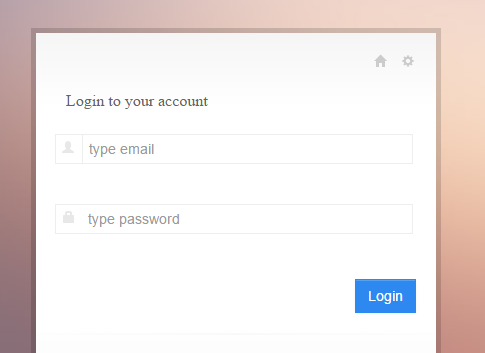
Step 6. Now we have create a View for loading the Login form with name “login.php”
Login to your account
Step 7. create Dashboard View in views folder named dashboard.php with following code
| Welcome | LOGOUT |
| Now you are logged are in and this is dashboard view | |
| You cannot directly inter in this area,want to try on unlogged session ? just copy the current url from url bar and logout out by clicking on log out link in top. | |
| Now Paste the url in browser again it will automatic redirect to login form. | |
If you Want Seo friendly Url or Remove index.php from the codeigniter url then Read following article.