-
 Jeetendra Singh
 - 13 Jun, 2016
Set frame height dynamically using javascript
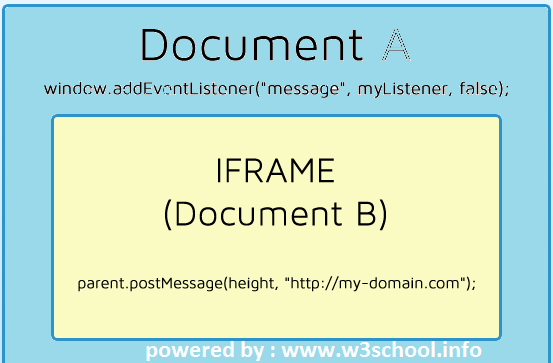
Hi Geeks, As I faced the problem in so many times for Set Iframe height dynamically using javascript or setting the Iframe height as per its content, If we add the fix height to Iframe tag directly then it just show the scrollbar in that height but sometime we don’t want to show the scrollable area in that Iframe then there are so complex situation to set the Iframe height for dynamic content and the height may vary or Iframe on content coming from database or any other source. Now we don’t know that what exactly the height of iframe due to its dynamic content, I have tried So many solution for it and finally i left the issue and provide static height to Iframe, i tried all DOM related access manipulations and it just failed due to cross origin and CORS violation issues. But one day for my selfishness in one project i faced same requirement with an Iframe and if i use the Iframe then it was saving my lot of time So i researched for 4-5 hours and finally i got perfect solution for it. SOLUTION : We need to implement the channel communication between parent window and Iframe window by passing the messages . It will work for same or cross domain origins Note : we should have access for the Iframe source page. we’ll post a message from the Iframe source page having a height value to the client domain by using following script // all content including images has been loaded window.onload = function() { // post our message to the parent window.parent.postMessage( // get height of the content document.body.scrollHeight // set target domain ,"*" ) };Now where you are creating Iframe ,Go to that page Like your Iframe is having like thatwe have putted dummy url and set the style to overflow hidden and set frameborder as 0 . and passed width as 100% but didn’t passed the height so for getting calculated the height automatic please put the script as follow // browser compatibility: get method for event // addEventListener(FF, Webkit, Opera, IE9+) and attachEvent(IE5-8) var myEventMethod = window.addEventListener ? "addEventListener" : "attachEvent"; // create event listener var myEventListener = window[myEventMethod]; // browser compatibility: attach event uses onmessage var myEventMessage = myEventMethod == "attachEvent" ? "onmessage" : "message"; // register callback function on incoming message myEventListener(myEventMessage, function (e) { // we will get a string (better browser support) and validate // if it is an int - set the height of the iframe #my-iframe-id if (e.data === parseInt(e.data)) document.getElementById('MY_IFRAME_ID;).height = e.data + "px"; }, false);This script will recieve the message passed from Iframe source origin and add the height of iframe dynamically . Note : MY_IFRAME_ID is the id of Iframe we assumed , you can replace it with your Iframe id in Iframe and script both Please comment below if you have any query related to this post or feature
- Jeetendra Singh
- 16 May, 2016
form validation library in php
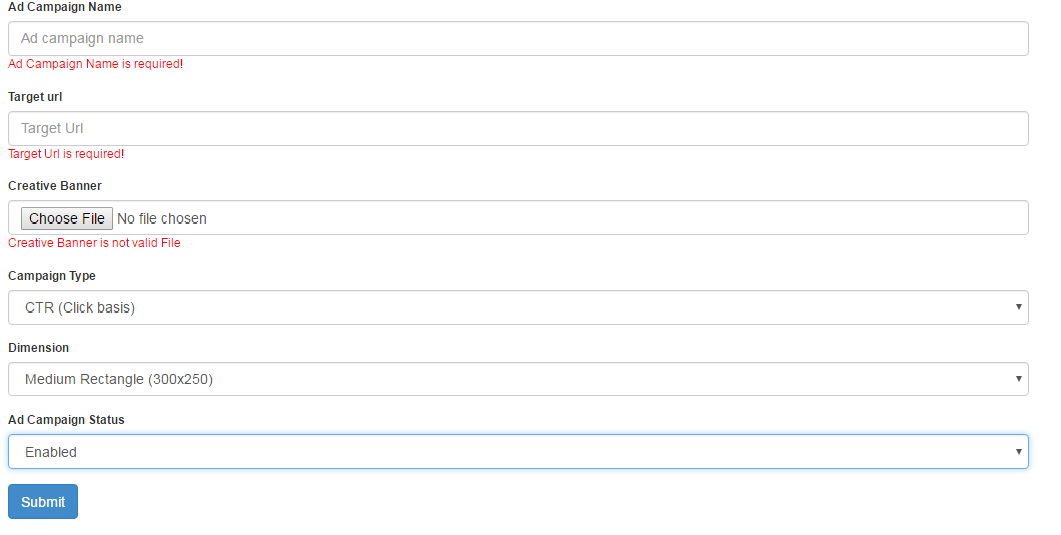
Hi Geeks, Today i am sharing a generic class for Form validation library in php & it also populate if form validation failed. First of all you can download the ‘form validation library in php’ by clicking on following url. https://github.com/g10dra/form_validation_php/blob/master/class.validation.php Now in this class you can validate the require,numeric,file-extension,match password & confirm password,validate url and other validation also. It is having a validation with database like is_unique in mysql database where you need pass the db connection if you want to user is_unique validation. Step 1: Include & Initialize the class in header or before your form s following: //include the form validation class// require 'class.validation.php'; or any of your path where you have save the class $db_details=array();//array for db details for validation some fields like is_unique from DB. //pass the varribale dynamic or static $db_details['db_host']=DB_HOST; $db_details['db_user']=DB_USER; $db_details['db_password']=DB_PASS; $db_details['db_name']=DB_NAME; $validation= new validation($db_details); // Step 2: Create a HTML FORM we are assuming that we have a form for add/edit ‘Advertise campaign’ form Read the full comments in code Add / Update Campaign num_rows( $query ) > 0 ) { $_edited_data = $database->get_results( $query ); $_edited_data=$_edited_data[0]; } else{ header("location:campaign.php?err=something bad happen !"); } } else { //add time initialize the blank data in edit data varriable ,if we are add action $_edited_data=array(); $_edited_data['ad_name']=""; $_edited_data['end_url']=""; $_edited_data['campaign_type']=""; $_edited_data['dimension']=""; $_edited_data['is_active']=""; } ?> </div> <div class="panel-body"> <form enctype="multipart/form-data" method="post"> <input type="hidden" name="is_post" value="1" /> <!-- field for detecting if form is submitted or not --> <input type="hidden" name="edit_id" value="<?php echo (isset($_GET['id']))? $_GET['id'] : "0"; ?>" /> <!-- field for detecting if form is submitted in edit or add mode --> <fieldset> <div class="form-group"> <label>Ad Campaign Name</label> <input value="<?php echo $validation->set_val("ad_name",$_edited_data['ad_name']); ?>" name="ad_name" class="form-control" placeholder="Ad campaign name" type="text"> <?php echo $validation->error_message("ad_name","<span style='color:red'>"); ?> <!-- $validation->set_val() is having 2 parameter 1st is a field name and second is for default value or edit mode populated value.//This method used to populate the text field value $validation->error_message() is having 2 params first is the field name and second is the opening tag of html tag where error should show in designed form,do not clode the tag it will autoclose the opened tag passed over it. --> </div> <div class="form-group"> <label>Target url</label> <input value="<?php echo $validation->set_val("end_url",$_edited_data['end_url']); ?>" name="end_url" class="form-control" placeholder="Target Url" type="text"> <?php echo $validation->error_message("end_url","<span style='color:red'>"); ?> </div> <div class="form-group"> <label>Creative Banner</label> <input class="form-control" name="ad_media_file" type="file" > <?php if(isset($_edited_data['ad_media_file']) && $_edited_data['ad_media_file']!="") { echo '<img style="max-width:300px;height:auto" src="AD_MEDIA/'.$_edited_data['ad_media_file'].'" />'; } echo $validation->error_message("ad_media_file","<span style='color:red'>"); ?> </div> <div class="form-group"> <label>Campaign Type</label> <select <?php if(isset($_GET['id']) && $_GET['id']!=""){ echo "disabled"; } ?> name="campaign_type" class="form-control input-md"> <option <?php echo $validation->set_select("campaign_type","1",$_edited_data['campaign_type']); ?> value="1">CTR (Click basis)</option> <option <?php echo $validation->set_select("campaign_type","2",$_edited_data['campaign_type']); ?> value="2">CPM (impression every 1k)</option> </select> <!-- $validation->set_select() is having 3 params for first is field name second is for seting selected=selected if value matched in failed post, and third is for seleted by default in edit mode --> </div> </div> <div class="form-group"> <label>Ad Campaign Status </label> <select name="is_active" class="form-control input-md"> <option <?php echo $validation->set_select("is_active","1",$_edited_data['is_active']); ?> value="1">Enabled</option> <option <?php echo $validation->set_select("is_active","0",$_edited_data['is_active']); ?> value="0">Disabled</option> </select> </div> </fieldset> <div> <button type="submit" class="btn btn-primary"> <i class="fa fa-save"></i> Submit </button> </div> </form> </div> </div>Step 3: Create a Table for advertise add/edit using following sql dump CREATE TABLE IF NOT EXISTS tbl_ads ( a_id int(11) NOT NULL AUTO_INCREMENT, user_id int(11) NOT NULL, ad_name varchar(255) NOT NULL, ad_media_file text NOT NULL, end_url tinytext NOT NULL, total_impression int(11) NOT NULL, campaign_type enum('1','2') NOT NULL COMMENT '1 for click base 2 for impression', is_active enum('0','1') NOT NULL DEFAULT '1', approved enum('0','1') NOT NULL DEFAULT '0', is_delete enum('0','1') NOT NULL DEFAULT '0', added_date datetime NOT NULL, updated_date datetime NOT NULL, remark text NOT NULL, PRIMARY KEY (a_id) ) ENGINE=InnoDB DEFAULT CHARSET=latin1 AUTO_INCREMENT=1 ; Step 4: Now need to post the form and recieve data and show errors, Recieve post Before the HTML form if(isset($_POST['is_post'])) //check form is posted { extract($_POST);//extract the form in its filed name vars using php function extract //now create a is_unique rule for ad name for AD/EDIT MOde both if(isset($edit_id) && $edit_id!=0)//it means it is in edit mode { $is_unique_expression="tbl_ads::ad_name::a_id!=".$edit_id; } else { $is_unique_expression="tbl_ads::ad_name"; } /* So for -> is_unique_expression :: First data is for table_name second is for column_name to match third is for where_condition in edit case or any specific requirement (optional) ALl are seperated with :: (double colon) / //validation rules $config_validation=array( array('field'=>"ad_name", "label"=>"Ad Campaign Name", "rules"=>"required|is_unique[".$is_unique_expression."]", ), array('field'=>"campaign_type", "label"=>"Campaign Type", "rules"=>"required", ), array('field'=>"is_active", "label"=>"Ad Campaign Status", "rules"=>"required", ), array('field'=>"ad_media_file", "label"=>"Creative Banner", "rules"=>"file_required|valid_file[AD_MEDIA::png,jpg,jpeg,gif]", ), array('field'=>"end_url", "label"=>"Target Url", "rules"=>"required|valid_url", ) ); //rule names must seperated with pipe | / rule => usage required => means must required item valid_url => used for validate a url format file_required => user to set must upload validation for a input type file valid_file => valid file passes a string for validate file time in [] fist is the folder name seperated with double column :: second is for extnsions seperated with comma (,) is_unique => used for matching value already exist in database or not for both edit and add case, in edit case we can pass the extra where case for self safe */ //now pass the configuration array of fileds $validation->init($config_validation); //if form successfully submitted by passing all rules// if($validation->form_success==1) { //do whatever want to do if(isset($edit_id) && $edit_id!=0) //detect it is in edit mode { $ad_media_file = (isset($validation->return_array['ad_media_file']))?$validation->return_array['ad_media_file']:""; //$validation->return_array is a array set the key with file field name if file successfully posted. //means it set the file field name key in '$validation->return_array' with input type file name. //so we can get the uploaded file name by passing the file type field name in $validation->return_array like this >> $validation->return_array['ad_media_file']; //this is save action when we edit any item $date=date('Y-m-d H:i:s'); $update = array( 'ad_name' => $ad_name, 'is_active' => $is_active, 'dimension' => $dimension, 'end_url' => $end_url, 'updated_date' => $date ); if($ad_media_file!="") { $update['ad_media_file'] = $ad_media_file; } //Add the WHERE clauses $where_clause = array( 'a_id' => $edit_id ); $updated = $database->update( 'tbl_ads', $update, $where_clause, 1 ); if( $updated ) { header('location:campaign.php?msg=Ad Campaign Updated Successfully!'); } } else { //detect that form post done for add a new campaign $ad_media_file = $validation->return_array['ad_media_file']; //this is add action where we add new item $date=date('Y-m-d H:i:s'); $data = array( 'ad_name' => $ad_name, 'campaign_type' => $campaign_type, 'user_id' => $_SESSION['user_id'], 'is_active' => $is_active, 'dimension' => $dimension, 'ad_media_file' => $ad_media_file, 'end_url' => $end_url, 'added_date' => $date, 'updated_date' => $date ); $add_query = $database->insert( 'tbl_ads', $data ); if( $add_query ) { header('location:campaign.php?msg=Ad Campaign Added Successfully!'); } } //do whatever want to do } else{ //echo ""; //print_r($validation->errors_array); //die; //$validation->errors_array is the complete array with all errors of form. } } Please Comment If any problem in this. I’ll assist you to use this form validation library
- Jeetendra Singh
- 14 Apr, 2016
Verify Email is Exists in real world or not ,Download Php code
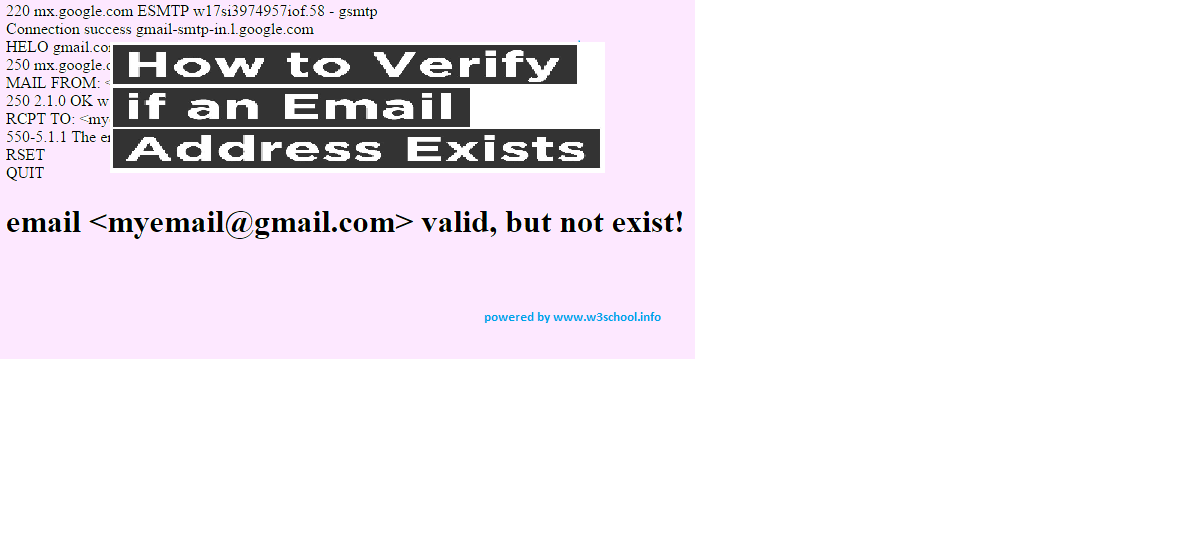
Hi Geeks, As per need in one of my project, i have used following code for Check Email is Exists in real world or not . In this tutorial we have made a class for checking a email id is exists or not and also checking it is valid or not. and we have a example file also for calling the verify method. You can also download full source code from link given at bottom of the post. Step 1: Create a class with name ‘class.verifyEmail.php’ having following code snippet. * @copyright Copyright (c) 2015, w3school.info */ class verifyEmail { protected $stream = false; /** * SMTP port number * @var int */ protected $port = 25; /** * email address for request * @var string */ protected $from = 'root@localhost'; /** * The connection timeout, in seconds. * @var int */ protected $max_connection_timeout = 30; /** * Timeout value on stream, in seconds. * @var int */ protected $stream_timeout = 5; /** * Wait timeout on stream, in seconds. * * 0 - not wait * @var int */ protected $stream_timeout_wait = 0; /** * Whether to throw exceptions for errors. * @type boolean * @access protected */ protected $exceptions = false; /** * The number of errors encountered. * @type integer * @access protected */ protected $error_count = 0; /** * class debug output mode. * @type boolean */ public $Debug = false; /** * How to handle debug output. * Options: * * `echo` Output plain-text as-is, appropriate for CLI * * `html` Output escaped, line breaks converted to ``, appropriate for browser output * * `log` Output to error log as configured in php.ini * @type string */ public $Debugoutput = 'echo'; /** * SMTP RFC standard line ending. */ const CRLF = "\r\n"; /** * Holds the most recent error message. * @type string */ public $ErrorInfo = ''; /** * Constructor. * @param boolean $exceptions Should we throw external exceptions? */ public function __construct($exceptions = false) { $this->exceptions = (boolean) $exceptions; } /** * Set email address for SMTP request * @param string $email Email address */ public function setEmailFrom($email) { if (!self::validate($email)) { $this->set_error('Invalid address : ' . $email); $this->edebug($this->ErrorInfo); if ($this->exceptions) { throw new verifyEmailException($this->ErrorInfo); } } $this->from = $email; } /** * Set connection timeout, in seconds. * @param int $seconds */ public function setConnectionTimeout($seconds) { if ($seconds > 0) { $this->max_connection_timeout = (int) $seconds; } } /** * Sets the timeout value on stream, expressed in the seconds * @param int $seconds */ public function setStreamTimeout($seconds) { if ($seconds > 0) { $this->stream_timeout = (int) $seconds; } } public function setStreamTimeoutWait($seconds) { if ($seconds >= 0) { $this->stream_timeout_wait = (int) $seconds; } } /** * Validate email address. * @param string $email * @return boolean True if valid. */ public static function validate($email) { return (boolean) filter_var($email, FILTER_VALIDATE_EMAIL); } /** * Get array of MX records for host. Sort by weight information. * @param string $hostname The Internet host name. * @return array Array of the MX records found. */ public function getMXrecords($hostname) { $mxhosts = array(); $mxweights = array(); if (getmxrr($hostname, $mxhosts, $mxweights) === FALSE) { $this->set_error('MX records not found or an error occurred'); $this->edebug($this->ErrorInfo); } else { array_multisort($mxweights, $mxhosts); } /** * Add A-record as last chance (e.g. if no MX record is there). * Thanks Nicht Lieb. * @link http://www.faqs.org/rfcs/rfc2821.html RFC 2821 - Simple Mail Transfer Protocol */ if (empty($mxhosts)) { $mxhosts[] = $hostname; } return $mxhosts; } /** * Parses input string to array(0=>user, 1=>domain) * @param string $email * @param boolean $only_domain * @return string|array * @access private */ public static function parse_email($email, $only_domain = TRUE) { sscanf($email, "%[^@]@%s", $user, $domain); return ($only_domain) ? $domain : array($user, $domain); } /** * Add an error message to the error container. * @access protected * @param string $msg * @return void */ protected function set_error($msg) { $this->error_count++; $this->ErrorInfo = $msg; } /** * Check if an error occurred. * @access public * @return boolean True if an error did occur. */ public function isError() { return ($this->error_count > 0); } /** * Output debugging info * Only generates output if debug output is enabled * @see verifyEmail::$Debugoutput * @see verifyEmail::$Debug * @param string $str */ protected function edebug($str) { if (!$this->Debug) { return; } switch ($this->Debugoutput) { case 'log': //Don't output, just log error_log($str); break; case 'html': //Cleans up output a bit for a better looking, HTML-safe output echo htmlentities( preg_replace('/[\r\n]+/', '', $str), ENT_QUOTES, 'UTF-8' ) . "\n"; break; case 'echo': default: //Normalize line breaks $str = preg_replace('/(\r\n|\r|\n)/ms', "\n", $str); echo gmdate('Y-m-d H:i:s') . "\t" . str_replace( "\n", "\n \t ", trim($str) ) . "\n"; } } /** * check up e-mail * @param string $email Email address * @return boolean True if the valid email also exist */ public function check($email) { $result = FALSE; if (!self::validate($email)) { $this->set_error("{$email} incorrect e-mail"); $this->edebug($this->ErrorInfo); if ($this->exceptions) { throw new verifyEmailException($this->ErrorInfo); } return FALSE; } $this->error_count = 0; // Reset errors $this->stream = FALSE; $mxs = $this->getMXrecords(self::parse_email($email)); $timeout = ceil($this->max_connection_timeout / count($mxs)); foreach ($mxs as $host) { /** * suppress error output from stream socket client... * Thanks Michael. */ $this->stream = @stream_socket_client("tcp://" . $host . ":" . $this->port, $errno, $errstr, $timeout); if ($this->stream === FALSE) { if ($errno == 0) { $this->set_error("Problem initializing the socket"); $this->edebug($this->ErrorInfo); if ($this->exceptions) { throw new verifyEmailException($this->ErrorInfo); } return FALSE; } else { $this->edebug($host . ":" . $errstr); } } else { stream_set_timeout($this->stream, $this->stream_timeout); stream_set_blocking($this->stream, 1); if ($this->_streamCode($this->_streamResponse()) == '220') { $this->edebug("Connection success {$host}"); break; } else { fclose($this->stream); $this->stream = FALSE; } } } if ($this->stream === FALSE) { $this->set_error("All connection fails"); $this->edebug($this->ErrorInfo); if ($this->exceptions) { throw new verifyEmailException($this->ErrorInfo); } return FALSE; } $this->_streamQuery("HELO " . self::parse_email($this->from)); $this->_streamResponse(); $this->_streamQuery("MAIL FROM: from}>"); $this->_streamResponse(); $this->_streamQuery("RCPT TO: "); $code = $this->_streamCode($this->_streamResponse()); //$this->_streamResponse(); $this->_streamQuery("RSET"); //$this->_streamResponse(); $this->_streamQuery("QUIT"); fclose($this->stream); switch ($code) { case '250': /** * http://www.ietf.org/rfc/rfc0821.txt * 250 Requested mail action okay, completed * email address was accepted */ case '450': case '451': case '452': /** * http://www.ietf.org/rfc/rfc0821.txt * 450 Requested action not taken: the remote mail server * does not want to accept mail from your server for * some reason (IP address, blacklisting, etc..) * Thanks Nicht Lieb. * 451 Requested action aborted: local error in processing * 452 Requested action not taken: insufficient system storage * email address was greylisted (or some temporary error occured on the MTA) * i believe that e-mail exists */ return TRUE; default : return FALSE; } } /** * writes the contents of string to the file stream pointed to by handle * If an error occurs, returns FALSE. * @access protected * @param string $string The string that is to be written * @return string Returns a result code, as an integer. */ protected function _streamQuery($query) { $this->edebug($query); return stream_socket_sendto($this->stream, $query . self::CRLF); } /** * Reads all the line long the answer and analyze it. * If an error occurs, returns FALSE * @access protected * @return string Response */ protected function _streamResponse($timed = 0) { $reply = stream_get_line($this->stream, 1); $status = stream_get_meta_data($this->stream); if (!empty($status['timed_out'])) { $this->edebug("Timed out while waiting for data! (timeout {$this->stream_timeout} seconds)"); } if ($reply === FALSE && $status['timed_out'] && $timed stream_timeout_wait) { return $this->_streamResponse($timed + $this->stream_timeout); } if ($reply !== FALSE && $status['unread_bytes'] > 0) { $reply .= stream_get_line($this->stream, $status['unread_bytes'], self::CRLF); } $this->edebug($reply); return $reply; } /** * Get Response code from Response * @param string $str * @return string */ protected function _streamCode($str) { preg_match('/^(?[0-9]{3})(\s|-)(.*)$/ims', $str, $matches); $code = isset($matches['code']) ? $matches['code'] : false; return $code; }}/** * verifyEmail exception handler */ class verifyEmailException extends Exception { /** * Prettify error message output * @return string */ public function errorMessage() { //$errorMsg = '' . $this->getMessage() . "\n"; $errorMsg = $this->getMessage(); return $errorMsg; }}?>Step 2. Now you can call the method after including the above class in any php file as follow: setStreamTimeoutWait(20); $vmail->Debug= TRUE; $vmail->Debugoutput= 'html'; $vmail->setEmailFrom('[email protected]');//email which is used to set from headers,you can add your own/company email over here if ($vmail->check($email)) { echo 'email exist!'; } elseif (verifyEmail::validate($email)) { echo 'email valid, but not exist!'; } else { echo 'email not valid and not exist!'; } ?>Now This is our example file where we have passed the email to be check through url parameter and just got the value using GET/REQUEST using php So create a file index.php with following code CHECK EMAIL IS EXISTS LIVE OR NOT <?php include_once 'class.verifyEmail.php'; // $email = $_REQUEST['email']; //pass an email here to test // $vmail = new verifyEmail(); $vmail->setStreamTimeoutWait(20); $vmail->Debug= TRUE; $vmail->Debugoutput= 'html'; $vmail->setEmailFrom('[email protected]'); if ($vmail->check($email)) { echo '<h1>email <' . $email . '> exist!</h1>'; } elseif (verifyEmail::validate($email)) { echo '<h1>email <' . $email . '> valid, but not exist!</h1>'; } else { echo '<h1>email <' . $email . '> not valid and not exist!</h1>'; } ?> </body>STEP 3. Now check the email using url as following http://localhost/email_verify/[email protected] STEP 3. Now check the email using url as following localhost/email_verify/[email protected] Now you can see the output and able to detect email is valid or now see results output – email verify [viraldownloader id=165 text=’Download Source Code’]
- Jeetendra Singh
- 25 Mar, 2016
Custom form validation in Codeigniter
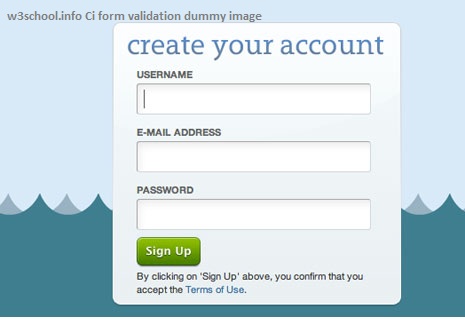
Hi Geeks, Today i am sharing you the Custom form validation example in codeigniter. Suppose we have a custom requirement to validate the data with our own custom rules like email already exist in database, So for this type on need can be resolve only with custom callback functions .these are the following steps to create a custom validation for any form. Step 1: Form Layout form.php in views 'registration_form', 'id' => 'registration_form', 'class' => 'form-horizontal')); ?> <div class="item form-group"> <label class="control-label col-md-3 col-sm-3 col-xs-12">First Name</label> <div class="col-md-6 col-sm-6 col-xs-12"> <input type="text" id="f_name" name="f_name" value="<?php set_value('f_name'); ?>" class="form-control" /> <span class="required-server"><?php echo form_error('f_name'); ?> </span> </div> </div> Last Name " class="form-control" /> Email " class="form-control" /> Password " class="form-control" />Now , We have 4 fields in this form – first name,last name, email and password for validate these fields codeigniter already provided rules in form_validation library: Some of the rules are following listed: valid_email,required,valid_email,valid_url,min_length[5]|max_length[12] etc. But Now we need to detect that email already registered in Database ,So we need to create a callback function for validating the email already check in database. Note:Codeigniter itself providing rule for ‘value already exists in database’ but here our purpose is to demonstrate the custom form validation in codeigniter thats why we are assuming that this need a custom form validation. Step 2. Create a callback to match the field’s value in database public function check_email_exists($email){ $where_array = array( user_email' => $email ); $this->db->where($where_array); $switch = $this->db->count_all_results("tbl_user"); if ($switch != NULL){ $this->form_validation->set_message('check_email_exists', 'The %s field value already exist, please try another.'); return false; }else{ return true; } }Step 3. Load Form validation library in controller’s Action or Constructor method as following: $this->load->library('form_validation'); Step 4. Now pass the array of validation rules for the form in add method of user controller as following: public function add() { $this->load->library('form_validation'); $config = array( array( 'field' => 'f_nme', 'label' => 'First Name', 'rules' => 'trim|required|xss_clean' ), array( 'field' => 'l_name', 'label' => 'Last Name', 'rules' => 'trim|required|xss_clean' ), array( 'field' => 'user_email', 'label' => 'Email Address', 'rules' => 'trim|required|xss_clean|callback_check_email_exists' //here we have added the callback which we have created by appending callback_ to its method name ), array( 'field' => 'user_password', 'label' => 'Password', 'rules' => 'trim|required|xss_clean' ) ); $this->form_validation->set_rules($config); //pass the rules array here if ($this->form_validation->run() == FALSE) { //by default initial load condition $this->load->view('form'); } else{ //controll comes here if form submitted successfully //Now add or update the data // $save_data = array( 'f_name' =>$this->input->post('f_name'), 'l_name' => $this->input->post('l_name'), 'user_email=> $this->input->post('user_email'), 'user_password' => $this->input->post('user_password') ); $this->db->insert('tbl_user',$save_data);//add data to tabke user }} ?> Please comment here if you have any query regarding to this form validation snippet or not cleared anything.
- Jeetendra Singh
- 20 Feb, 2016
How to work with AngularJS as frontend and PHP MYSQL as backend
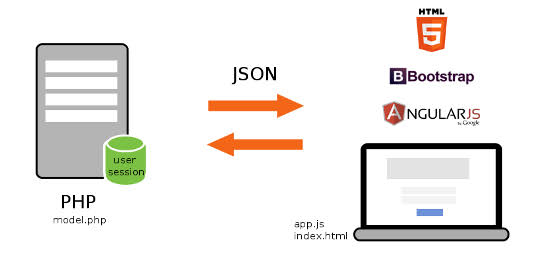
Hi Geeks, In this tutorial you will learn that how to work with AngularJs as web frontend or in any hybrid app and get retrieve data from database using php and mysql. We have created restful webservice for return records to angular app. Now steps for making a angularjs app with php and mysql – Step 1) Create a database and table for fetching content from the table Note: If you want to use existing database then select you db else create a new db with ‘news_db’ or whatever you want to take a db name. Now Create a table named ‘news’ for getting data by following sql statement CREATE TABLE IF NOT EXISTS news ( id int(12) NOT NULL AUTO_INCREMENT, title varchar(255) NOT NULL, permalink varchar(255) NOT NULL, details text NOT NULL, thumbnail varchar(255) NOT NULL, category_id int(12) NOT NULL, source_id int(12) NOT NULL, datetime int(12) NOT NULL, day int(2) NOT NULL, month int(2) NOT NULL, year int(4) NOT NULL, hits int(12) NOT NULL, published int(1) NOT NULL, PRIMARY KEY (id) ) ENGINE=MyISAM DEFAULT CHARSET=utf8 AUTO_INCREMENT=1; Now Dump some dummy records by following insert statement: -- -- Dumping data for table news INSERT INTO news (id, title, permalink, details, thumbnail, category_id, source_id, datetime, day, month, year, hits, published) VALUES (1, 'MY NEWS TITLE 1', '', 'The standard chunk of Lorem Ipsum used since the 1500s is reproduced below for those interested. Sections 1.10.32 and 1.10.33 ', '11621455015936.jpg', 1, 0, 1455015936, 9, 2, 2016, 45, 1), (2, 'MY NEWS TITLE 2', '', 'Lorem Ipsum is simply dummy text of the printing and typesetting industry. ', '76911455015952.jpg', 2, 0, 1455015952, 9, 2, 2016, 73, 0); Step 2) Create a file named config.php with following codechange credential according to your database and server host Step 3) Now create a file for webservices named wsdl.php Define Cross origin headers in this file by following codeNow code for getting data from database and provide in restful json format by following code query("SELECT title,details,hits FROM news"); $data=array(); while($rs = $result->fetch_array(MYSQLI_ASSOC)) { $row=array(); $row['title']=addslashes($rs["title"]); $row['details']=addslashes($rs["details"]); $row['hits']=addslashes($rs["hits"]); $data[]=$row; } $jsonData=array(); $jsonData['records']=$data; $conn->close(); echo json_encode($jsonData);} ?>So complete Code for wsdl.php is following query("SELECT title,details,hits FROM news"); $data=array(); while($rs = $result->fetch_array(MYSQLI_ASSOC)) { $row=array(); $row['title']=addslashes($rs["title"]); $row['details']=addslashes($rs["details"]); $row['hits']=addslashes($rs["hits"]); $data[]=$row; } $jsonData=array(); $jsonData['records']=$data; $conn->close(); echo json_encode($jsonData);} ?>Step 4) Now Start with frontend Step for Getting data from database using angularjs as frontend and php & mysql as backed make a file named index.html include the script which i have attached with this postNow make a ng-app with following htmlmake a html table format inside the div for getting data from datasource(php/mysql restful service) as following {{ x.title }} {{ x.details }} {{ x.hits }}Now put the script that call the restful web service and load data to the tablevar app = angular.module('myApp', []); app.controller('newsCtrl', function($scope, $http) { $http.get("http://localhost/angular/wsdl.php?method=load_news") .then(function (response) {$scope.names = response.data.records;}); });Now complete Code for index.html {{ x.title }} {{ x.details }} {{ x.hits }}var app = angular.module('myApp', []); app.controller('newsCtrl', function($scope, $http) { $http.get("http://localhost/angular/wsdl.php?method=load_news") .then(function (response) {$scope.names = response.data.records;}); });Congratulations you have completed with this tutorial please provide comments for this tutorial. [viraldownloader id=146 text=’DOWNLOAD COMPLETE CODE’]

- Jeetendra Singh
- 09 Feb, 2016
Array to Xml Conversion and Xml to Array Convert in PHP
Hi Geeks, Today i am sharing you a code snippet for converting xml to array with attributes also and vice versa (Convert array to xml). This class is very useful to parse rss feed and to make rss feed in php programming. In this code snippet we have made a class to convert array XML using php code and also retaining its attibues stored into array . It returns the XML in form of DOMDocument class for further manipulation. This class will throw exception if the tag name or attribute name has illegal characters. Usage of this class: //convert array to xml// $php_array = array ();//this is your array data ,it comes from database also or you can define elements in php code also. $root_node="ROOT";//root node of the xml tree like//root , data or anything you want to make super parent tag for the xml $xml = Array2XML::createXML($root_node, $php_array);// echo $xml->saveXML(); //convert xml to array// $xmlstring='';//this varribale will contain xml string $xml_data = Array2XML::XML_TO_ARR($xmlstring);// A. Steps for Convert Array to Xml 1.Create a class named Array2XML with following code in file Array2XML.php formatOutput = $format_output; self::$encoding = $encoding; } /** * Convert an Array to XML * @param string $node_name - name of the root node to be converted * @param array $arr - aray to be converterd * @return DomDocument */ public static function &createXML($node_name, $arr=array()) { $xml = self::getXMLRoot(); $xml->appendChild(self::convert($node_name, $arr)); self::$xml = null; // clear the xml node in the class for 2nd time use. return $xml; } /** * Convert an Array to XML * @param string $node_name - name of the root node to be converted * @param array $arr - aray to be converterd * @return DOMNode */ private static function &convert($node_name, $arr=array()) { //print_arr($node_name); $xml = self::getXMLRoot(); $node = $xml->createElement($node_name); if(is_array($arr)){ // get the attributes first.; if(isset($arr['@attributes'])) { foreach($arr['@attributes'] as $key => $value) { if(!self::isValidTagName($key)) { throw new Exception('[Array2XML] Illegal character in attribute name. attribute: '.$key.' in node: '.$node_name); } $node->setAttribute($key, self::bool2str($value)); } unset($arr['@attributes']); //remove the key from the array once done. } // check if it has a value stored in @value, if yes store the value and return // else check if its directly stored as string if(isset($arr['@value'])) { $node->appendChild($xml->createTextNode(self::bool2str($arr['@value']))); unset($arr['@value']); //remove the key from the array once done. //return from recursion, as a note with value cannot have child nodes. return $node; } else if(isset($arr['@cdata'])) { $node->appendChild($xml->createCDATASection(self::bool2str($arr['@cdata']))); unset($arr['@cdata']); //remove the key from the array once done. //return from recursion, as a note with cdata cannot have child nodes. return $node; } } //create subnodes using recursion if(is_array($arr)){ // recurse to get the node for that key foreach($arr as $key=>$value){ if(!self::isValidTagName($key)) { throw new Exception('[Array2XML] Illegal character in tag name. tag: '.$key.' in node: '.$node_name); } if(is_array($value) && is_numeric(key($value))) { // MORE THAN ONE NODE OF ITS KIND; // if the new array is numeric index, means it is array of nodes of the same kind // it should follow the parent key name foreach($value as $k=>$v){ $node->appendChild(self::convert($key, $v)); } } else { // ONLY ONE NODE OF ITS KIND $node->appendChild(self::convert($key, $value)); } unset($arr[$key]); //remove the key from the array once done. } } // after we are done with all the keys in the array (if it is one) // we check if it has any text value, if yes, append it. if(!is_array($arr)) { $node->appendChild($xml->createTextNode(self::bool2str($arr))); } return $node; } /* * Get the root XML node, if there isn't one, create it. */ private static function getXMLRoot(){ if(empty(self::$xml)) { self::init(); } return self::$xml; } /* * Get string representation of boolean value */ private static function bool2str($v){ //convert boolean to text value. $v = $v === true ? 'true' : $v; $v = $v === false ? 'false' : $v; return $v; } /* * Check if the tag name or attribute name contains illegal characters * Ref: http://www.w3.org/TR/xml/#sec-common-syn */ private static function isValidTagName($tag){ $pattern = '/^[a-z_]+[a-z0-9\:\-\.\_]*[^:]*$/i'; return preg_match($pattern, $tag, $matches) && $matches[0] == $tag; } /* * Convert xml string into array. */ public static function XML_TO_ARR($xmlstring) { $xml = simplexml_load_string($xmlstring, "SimpleXMLElement", LIBXML_NOCDATA); $json = json_encode($xml); $array = json_decode($json,TRUE); return $array; } } ?>Now Include the classDefining Array or get it from database then call the createXML method for generating xml file$data_array = array( '@attributes' => array( 'type' => 'fiction' ), 'book' => array( array( '@attributes' => array( 'author' => 'Jeetendra Singh' ), 'title' => 'Learning PHP programming', 'price' => 'Free' ), array( '@attributes' => array( 'author' => 'Shailesh Verma' ), 'title' => 'Linux Aspects', 'price' => '$15.61' ), array( '@attributes' => array( 'author' => 'Eric Basendra' ), 'title' => 'IOS Dev', 'Company' => 'Oxilo India', 'price' => array( '@attributes' => array( 'discount' => '10%' ), '@value' => '$18.00' ) ) ) ); Now Call createXML method as following $root_node="data";//root node of the xml tree like//root , data or anything you want to make super parent tag for the xml $xml = Array2XML::createXML($root_node, $data_array);// $xml_STR = $xml->saveXML();// put string in xml_STR $xml->save('array_to_xml_convert.xml'); // save data in array_to_xml_convert.xml file B. Steps for Convert Xml to ArrayDefine the xml oe get the xml string into a varribale$xmlstring=' 4 first second fifth sub1 sub2 sub3 1234 '; Or $xmlstring=file_get_contents('myxml_file_path.xml');//get the string load into a varriable using file_get_contents method of php 2.Now call the XML_TO_ARR function as following $Array_Data = Array2XML::XML_TO_ARR($xmlstring);//pass the xml string print_r($Array_Data);//print your array [viraldownloader id=138 text=’DOWNLOAD COMPLETE CODE’]

- Jeetendra Singh
- 08 Feb, 2016
CONVERT HTML TO PDF IN CODEIGNITER Using MPDF
Hi Geeks, Today I am Sharing you the code for making pdf or download pdf files in codeigniter. In this Code snippet we have used the MPDF Kit for generating pdf of html views or dynamic templates. So Following are the steps to create/convert HTML to PDF In Codeigniter using MPDF Prerequisites :- GD LIBRARY SHOULD BE ACTIVE ON YOUR WEB SERVER Step 1: Download the Mpdf Class and methods from here or https://www.mediafire.com/?9qmqaw2yqlo5caa Now extract the zip file and put the mpdf folder to application >> third_party folder (this folder Exists in Application folder in codeigniter app ) Step 2. Now make a ci library to call/communicate the mpdf methods and classes from your ci controllers Now go to libraries folder in application folder and create a file named : M_pdf.php having following code snippet. load_library, and pass the data whatever you required in your view or get the data from model and just pass to your pdf view and use/render that data in your view just like a normal view and controllers.for sample , We have created a method named save_download having following codepublic function save_download() { //load mPDF library $this->load->library('m_pdf'); //load mPDF library //now pass the data// $this->data['title']="MY PDF TITLE 1."; $this->data['description']=""; $this->data['description']=$this->official_copies; //now pass the data // $html=$this->load->view('pdf_output',$this->data, true); //load the pdf_output.php by passing our data and get all data in $html varriable. //this the the PDF filename that user will get to download $pdfFilePath ="mypdfName-".time()."-download.pdf"; //actually, you can pass mPDF parameter on this load() function $pdf = $this->m_pdf->load(); //generate the PDF! $pdf->WriteHTML($html,2); //offer it to user via browser download! (The PDF won't be saved on your server HDD) $pdf->Output($pdfFilePath, "D"); }By using this code you will able to make a functionality to convert html to pdf in codeigniter: If you face any struggle in this please Comment below – Thanks & Cheers 🙂
- Jeetendra Singh
- 19 Jan, 2016
Progress bar for php form post , Download the Code
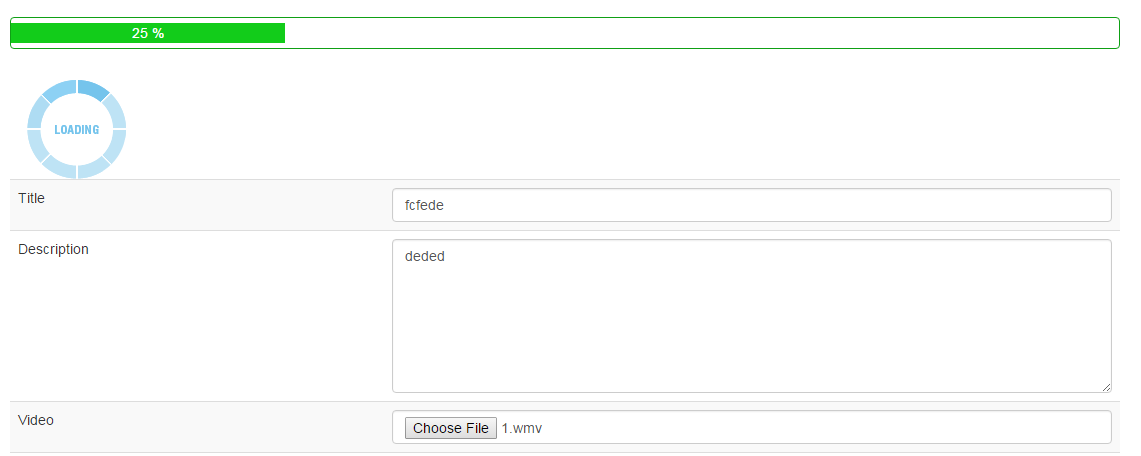
Hi Geeks, Now php has a feature for tracking the progress of multipart form submit. we can show the progress in percentage for user convenience .you can download the source code if you want to create progress bar in php form. Following are the steps to create a progress bar for php form post. Step 1. Add script and css for upload progress functionality workingStep 2. Form Tag should look likeNote: form id we have used myform so if you want to change the form id then you need to change in upload_script.js file also Step 3. Add the placement for showing progress barStep 4. In your upload or form post action you can add your code for demo purpose we have use as following:[viraldownloader id=126 text=’Download the Source code by sharing us on facebook.’]

- Jeetendra Singh
- 10 Jan, 2016
Text to Image Convert using php code . Download source Code
Hi Geeks, In this tutorial we will learn that how to Create and save dynamic image in php using gd library or Text to Image Convert using php code . in this example we have a requirement to create a image with specific width and height and specific background and watermark also. So that we have created a PHP Class to generate and save the image to specific folder or path. please follow the steps to achive this task. Step 1. Create a class file for generate image with name class.img.php with following code: _font1=$font_1; $this->_font2=$font_2; $this->_font_size=$font_size; $this->_font_size_watermark=$font_size_watermark;}public function imagettftext_cr(&$im, $size, $angle, $x, $y, $color, $fontfile, $text) { // retrieve boundingbox $bbox = imagettfbbox($size, $angle, $fontfile, $text); // calculate deviation $dx = ($bbox[2]-$bbox[0])/2.0 - ($bbox[2]-$bbox[4])/2.0; // deviation left-right $dy = ($bbox[3]-$bbox[1])/2.0 + ($bbox[7]-$bbox[1])/2.0; // deviation top-bottom // new pivotpoint $px = $x-$dx; $py = $y-$dy; return imagettftext($im, $size, $angle, $px, $y, $color, $fontfile, $text); }public function generate_img($name,$savepath,$size_arr,$watermark,$rgb=array("34","96","76")) {$image = imagecreate($size_arr['width'],$size_arr['height']); $rgb_background = imagecolorallocate($image,$rgb[0],$rgb[1],$rgb[2]); $grey_shade = imagecolorallocate($image,40,40,40); $white = imagecolorallocate($image,255,255,255);// Local font files, relative to script $otherFont = $this->_font1; $font = $this->_font2;$i=0; while($iimagettftext_cr($image,12,$this->_font_size_watermark,rand(100,500),rand(200,500),$grey_shade,$otherFont,$watermark); $i++; }// Main Text$w=$size_arr['width'] / 2 ; $h=$size_arr['height'] / 2 ;$this->imagettftext_cr($image,$this->_font_size,0,$w,$h,$white,$font,$name); $this->imagettftext_cr($image,$this->_font_size_watermark,0,$w,$h+30,$white,$otherFont,$watermark); imagejpeg($image,$savepath);}} ?>Step 2. make another php file with any name. and include the class file as follow:Now create a instance of img class with font file names and sizes as following :Init with font files and font sizes as follow:Now generate a single image as follow: "500","height"=>"500"); //define height and width $savepath="images/my_image_test.jpg"; $watermark="w3school test"; $rgb=array("0","0","0");//define a black rgb scheme $img_obj->generate_img($text_to_image,$savepath,$size_arr,$watermark,$rgb); //call the generate image ?>Generate multiple images in loop as following code : "1366","height"=>"768"); //define height and width $savepath="images/".$img_name.".jpg"; $watermark="w3school test watermark"; $rgb=array("34","96","76");//define a light green rgb scheme $img_obj->generate_img($title,$savepath,$size_arr,$watermark,$rgb); //call the generate image function // } ?>Complete Code of above snippets: "500","height"=>"500"); //define height and width $savepath="images/my_image_test.jpg"; $watermark="w3school test"; $rgb=array("0","0","0");//define a black rgb scheme $img_obj->generate_img($text_to_image,$savepath,$size_arr,$watermark,$rgb); //call the generate image //now generate a single image //generate multiple images in loop$text=array("MY IMAGE TEXT 1","MY IMAGE TEXT 2","MY IMAGE TEXT 3","MY IMAGE TEXT 4","MY IMAGE TEXT 5",); foreach($text as $title) { // $img_name=strtolower(str_replace(" ","-",$title)); $size_arr=array("width"=>"1366","height"=>"768"); //define height and width $savepath="images/".$img_name.".jpg"; $watermark="w3school test watermark"; $rgb=array("34","96","76");//define a light green rgb scheme $img_obj->generate_img($title,$savepath,$size_arr,$watermark,$rgb); //call the generate image function // }//generate multiple images in loop?>[viraldownloader id=113 text=’Download the Complete Code by Sharing this post and click on generate button after sharing’] Note: please confirm GD library on your php server. and create a images folder in project with 755 or 775 or 777 permissions.
- Jeetendra Singh
- 22 Dec, 2015
How to make a news aggregator website
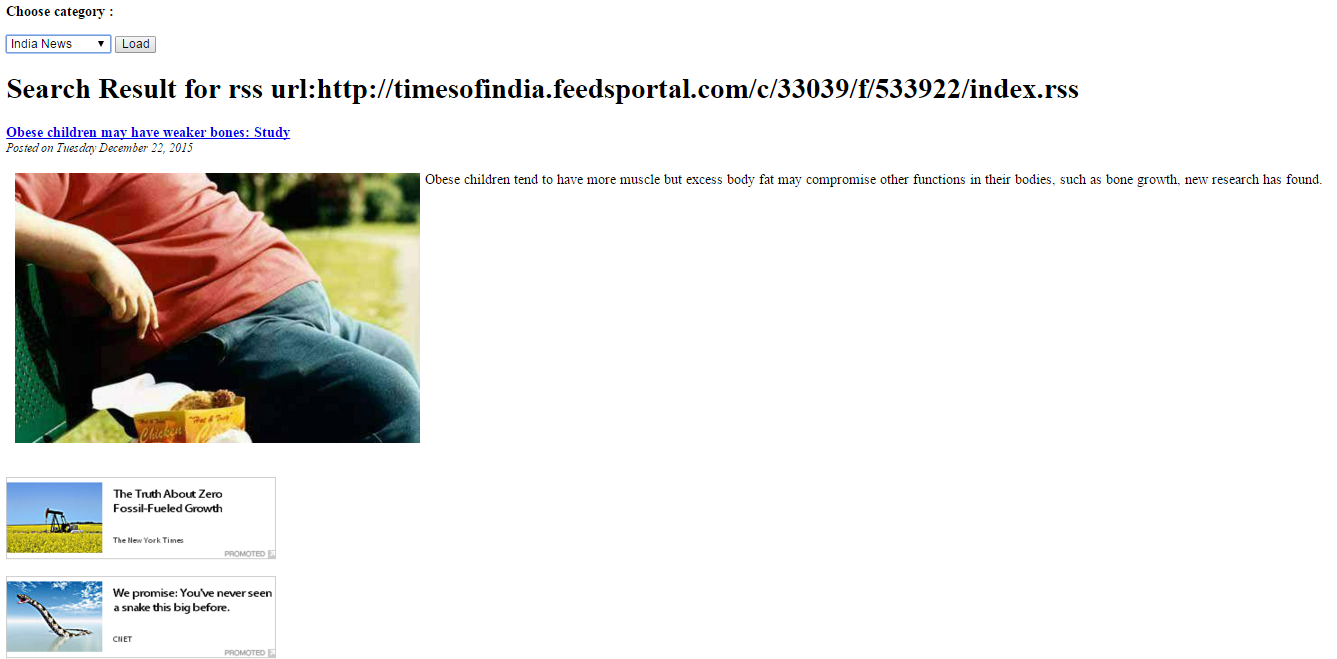
Hi Geeks, I am Sharing you the code for reading a rss feed using php script. Following are the Steps to make a news aggregator website using rss reader in php Step 1: Create a form having Rss Urls in select box as following Choose category :Select India News World News Science NewsStep 2. Php code to recieve the submitted post and rss url. and get the rss output in object and parse the feed or rss using the dom document class and accessing the properties as following: Search Result for rss url:'.$_POST['rssurl'].''; $rssurl=$_POST['rssurl']; $rss = new DOMDocument(); $rss->load($rssurl); $feed = array(); foreach ($rss->getElementsByTagName('item') as $node) { $item = array ( 'title' => $node->getElementsByTagName('title')->item(0)->nodeValue, 'desc' => $node->getElementsByTagName('description')->item(0)->nodeValue, 'link' => $node->getElementsByTagName('link')->item(0)->nodeValue, 'date' => $node->getElementsByTagName('pubDate')->item(0)->nodeValue, ); array_push($feed, $item); } $limit = 5; for($x=0;$x'.$title.''; echo 'Posted on '.$date.''; echo ''.$description.''; } } ?>Final Complete Code: Choose category :Select India News World News Science Newsif(isset($_POST['rssurl'])) { echo 'Search Result for rss url:'.$_POST['rssurl'].''; $rssurl=$_POST['rssurl']; $rss = new DOMDocument(); $rss->load($rssurl); $feed = array(); foreach ($rss->getElementsByTagName('item') as $node) { $item = array ( 'title' => $node->getElementsByTagName('title')->item(0)->nodeValue, 'desc' => $node->getElementsByTagName('description')->item(0)->nodeValue, 'link' => $node->getElementsByTagName('link')->item(0)->nodeValue, 'date' => $node->getElementsByTagName('pubDate')->item(0)->nodeValue, ); array_push($feed, $item); } $limit = 5; for($x=0;$x<$limit;$x++) { $title = str_replace(' & ', ' & ', $feed[$x]['title']); $link = $feed[$x]['link']; $description = $feed[$x]['desc']; $date = date('l F d, Y', strtotime($feed[$x]['date'])); echo ''.$title.''; echo 'Posted on '.$date.''; echo ''.$description.''; } } ?> Conclusion : Select your category and click on go button and you will see the fetched news from rss feed. read rss using php script